
Easy Article Navigation
Previous and next article links with the intro image, a series count, and colors you set. No template edit.
30-day money-back guarantee
Changelog — Easy Article Navigation
Version 1.0.1: 20 October 2026
- Download Key support on the update site (dlid).
Version 1.0.0: 02 October 2026
- First release. Previous and next links with an intro image, cards and compact layouts, series count, and module colors.
Content plugin and module
Easy Article Navigation
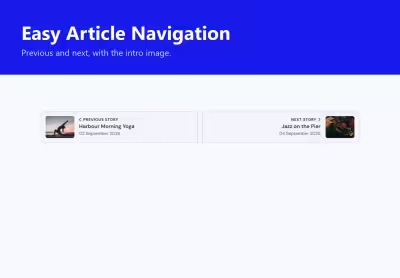
Previous and next, with the intro image.
Joomla page navigation is two text buttons. Easy Article Navigation adds the intro image, the date, the category, a series line, and colors that stay inside their own class. The strip under this article is the live module.
This guide
A weekend in the city
Six illustrated articles, in editor order. Open the tabs to see the same neighbors as cards, a compact row, a series count, brand colors, a stacked sidebar, category meta, the last article, and a loop back to the start.
Cards
Intro image, title, and date. Labels can say Previous story and Next story.
Compact
A short row for the end of a long article or a narrow column.
Series
Two custom fields replace category order and show Article N of M.
Brand colors
Label, title, background, and border. Empty fields inherit the template.
Sidebar
Stacked cards for a side position. Here they sit under the article so you can compare them.
Category and date
Turn meta on or off per module. This one shows the category name.
Last article
On the last story the next side is hidden. The previous card stays.
Loop
The same last story wraps. Next returns to the first article in the guide.
First-time setup
Four steps
- Give the articles an intro image and an order in the category.
- Publish the module on the article view, or turn on insert in the content plugin.
- Choose cards or compact, and what to show: image, title, date, category, labels.
- Optional: two custom fields for a series name and a position. The line reads Article N of M.