
Easy Find and Replace
Search and replace across Joomla database tables with dry-run previews, safety rails, JSON and serialized data support and one-click rollback.
30-day money-back guarantee

Changelog — Easy Find and Replace
Version 1.0.1: 19 October 2026
- Runs on Joomla 5 and 6 with the Behaviour Backward Compatibility plugins disabled
- Admin assets load through the web asset manager
Version 1.0.0: 18 September 2026
- New Feature: Initial commercial release of Easy Find and Replace for Joomla 4.4+, 5, and 6.
- New Feature: Interactive Find, Preview (Dry Run), and Execute Replace wizard with AJAX batch processing.
- New Feature: Schema discovery across core and third-party tables with scope presets and custom selection.
- New Feature: JSON and serialized PHP integrity handling with recalculated string byte lengths.
- New Feature: Safety rails for primary keys, credential columns, session/MFA tables, and fail-closed snapshots.
- New Feature: Snapshot History & Rollback with conflict detection.
- New Feature: Paginated preview results, Configuration screen, and dashboard KPIs.
- Improvement: Abandoned running jobs auto-close as Cancelled; dry-run can be required before live replace.
What Easy Find and Replace can do for you

Search your whole database
Find text, URLs, HTML or a regex pattern across Joomla core and third-party tables, with case-sensitive and whole-word options.

Preview before you replace
A dry run shows every match with its original and new value, plus counts by table, before anything is written.

Undo with one click
Each replace saves a snapshot, so you can roll a job back from History & Rollback. Rows edited since are skipped, so newer work stays.

Safety rails on by default
Primary keys, password hashes, tokens and sessions are protected, and you can add your own protected column names.

JSON and serialized data stay valid
JSON and serialized PHP values are decoded, updated with the right string lengths and saved back, so module and plugin settings keep working.

Choose your scope
Pick Articles & Custom Fields, Menus & Modules, every searchable table or your own table list.

Steady on big sites
Work runs in AJAX batches with a progress bar and a Cancel button, and you set the batch size and timeout.

Right access for each person
Separate permissions for search, replace and rollback, and a history of every job with who ran it and when.
How it works in 3 steps
Search
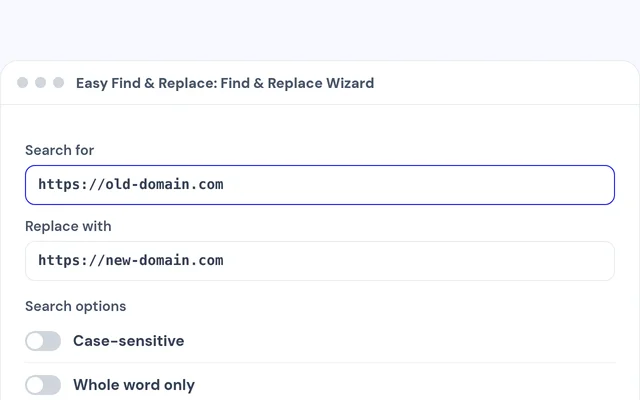
Enter what to find and what to replace it with, then pick the tables.
Preview
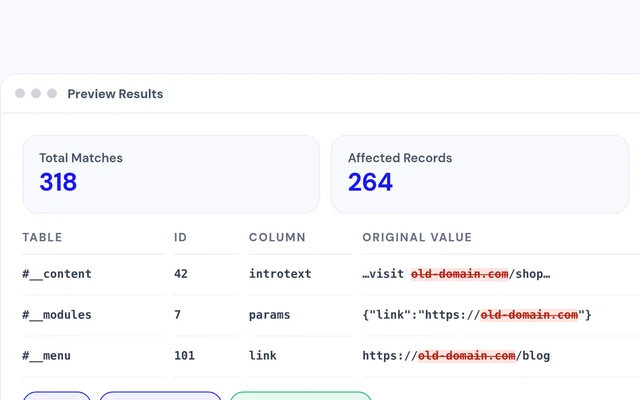
Run a dry run and check the before and after values.
Replace
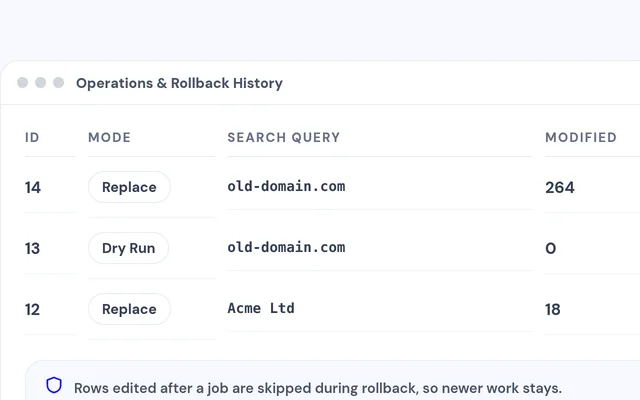
Execute when it looks right, and roll back from History if you need to.


Compatibility
FAQ
Which Joomla and PHP versions does it support?
Joomla 4.4 or later, Joomla 5 and Joomla 6, with PHP 8.1 or later.
Can I use it to change my site's domain?
Yes. Search for the old URL, preview the matches, then replace. JSON and serialized settings are updated with the right lengths.
Can I undo a replacement?
Yes. With snapshots on, every replace can be rolled back from History & Rollback.
Does it search third-party extension tables?
Yes. Choose All Searchable Tables or pick the tables you want from the list.
Can I stop editors from running replacements?
Yes. Search, replace and rollback each have their own permission, so you decide who can do what.
Can I make a dry run required?
Yes. Turn on Require Dry Run First, and Execute Replace waits for a matching preview.
Ready to add Easy Find and Replace to your site?
Read the Easy Find and Replace documentation, then pick a plan.
Get Easy Find and Replace (opens in a new window)Read the documentation (opens in a new window)