Joomla L
Library
A library is shared PHP or JS code other extensions can reuse.

Joomla libraries power MVC, routing, and web assets.
Easy Glossary stays inside its component namespace.
In practice
- Avoid global JS name clashes; use EasyGlossary.

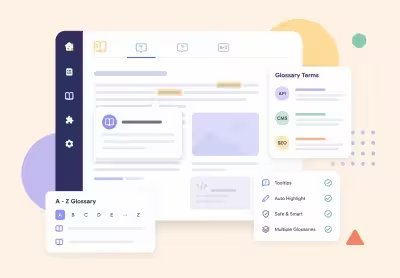
Terms, tooltips, and A-Z pages. Safe auto highlight in articles for Joomla 4, 5, and 6.
30-day money-back guarantee
Version 1.0.17: 7 September 2026
es-ES, fr-FR, it-IT, de-DE, and pt-BR across the component, module, and plugins (contribution by Marcos Cappa).Text::script / Joomla.Text._() so the button UI follows the site language.Version 1.0.16: 7 September 2026
N vs Ñ; when Off, search uses normal database accent folding. A-Z letter navigation always follows the glossary alphabet. Sounds Like stays phonetic.Version 1.0.13: 7 September 2026
short_def/fulltext HTML via the same safehtml InputFilter mode as the term form (default InputFilter was stripping lists/emphasis).utf8mb4_bin so Spanish N and Ñ do not collapse in sort order.COM_EASYGLOSSARY_SELECT_TERM for the Term page menu picker.cli/qa_preflight_easyglossary.php covers Marcos regressions plus adversarial letter/HTML/lang/version checks.Version 1.0.12: 7 September 2026
letter with utf8mb4_bin so Spanish N and Ñ stay separate under utf8mb4_unicode_ci tables; embed/module letter lists follow glossary alphabet order.fulltext/short_def with InputFilter html; the term form safehtml filter keeps allowed markup for round-trips.com_easyglossary.sys.ini includes COM_EASYGLOSSARY_MENU_TERM_DESC for the Term page menu type.Version 1.0.11: 6 September 2026
short_def when fulltext is empty (lead only; body renders fulltext when present).related_ids (fancy-select omitted key treated as empty on full form save) and still removes reciprocal backlinks.var(--egloss-accent) via color-mix instead of hardcoded default blue.Version 1.0.10: 5 September 2026
populateState() no longer calls getState() while initializing list limit/start.related_ids are validated against existing terms before storage.com_easyglossary.* and com_content.* contexts.Version 1.0.9: 5 September 2026
core.create-only user; updating related links on pre-existing terms still requires core.edit.Version 1.0.8: 4 September 2026
access cannot represent logical AND).#__contentitem_tag_map and UCM rows for com_easyglossary.term before dropping tables / content type.glossaryAlias|glossaryLang|termAlias|termLang keys and resolve in a second import pass; legacy numeric related_ids still accepted for same-database imports.ASSET_VERSION aligned to 1.0.8; duplicate COM_EASYGLOSSARY_USAGE_COUNT INI key removed; component package ships a single installer script.php.Version 1.0.7: 4 September 2026
a so term save/reindex no longer fails with Unknown column a.id.glossary_id), not #__categories; glossary save/state/delete reindexes or removes child terms; access sync reindexes instead of assuming nested view levels via max().*; unpublished parent/term rows are removed from the index; non-Public glossary access gates the Finder link.index.php term routes (not admin-routed URLs) and adds Type/Language/Category taxonomy.glossary_id = 0).related_ids.MenuItem::$published.glossary_language; ambiguous glossary/term language matches are skipped; import enforces upload error, 5 MB and row caps; export/sample links use Session::getFormToken().1.0.1.sql is idempotent (CAN FAIL).format=xml supported); TermTable is taggable; configuration save clears matcher cache; missing glossary id returns 404; published values keep trash/archive.minimumJoomla raised to 5.0 (Joomla 5 and 6). Release metadata (ReadMe, assets, Wikipedia UA) aligned to 1.0.7.Version 1.0.5: 3 September 2026
Version 1.0.4: 2 September 2026
Version 1.0.3: 1 September 2026
classStack permanently active.core.admin or core.delete; UI warnings strengthened.glossary_alias cannot be resolved instead of silently falling back to another glossary.Version 1.0.2: 31 August 2026
Joomla L
A library is shared PHP or JS code other extensions can reuse.
Joomla libraries power MVC, routing, and web assets.
Easy Glossary stays inside its component namespace.
Why teams pick it
Publish A-Z pages, term detail pages with images, and accessible in-article tips. Highlighting skips headings, links, and code. Search supports contains, begins with, exact, and sounds like. Featured terms can surface first.
Skips headings, links, buttons, and code. First occurrence and a page cap keep pages readable.
Letter nav, featured filter, AJAX search, and pages or Load more (or both when you want them).
The same spelling can belong to different dictionaries. Scope by article category or per article.
Cards and term pages can show an intro image. Demo terms ship with branded covers.
Term pages emit schema. Unique document titles and meta descriptions per listing and term.
Keyboard focus, aria-describedby, Helix-safe tips. No jQuery and no CDN.
Visitors can suggest a term. Optional notify email and publish-later workflow for editors.
Pick See also terms from a multi-select so definitions stay connected across the dictionary.
Match CMS, abbreviations, and Content Management System from one term. Tips can list synonyms.
While you edit a term, see where it is mentioned. CSV import/export and Finder indexing included.
First-time setup