Skip to content
module
Utilities

Easy YouTube Feed

Channel or playlist YouTube feed for Joomla. Grid, search, tabs, lightbox, pagination.

J4 J5 J6
5.0 v1.0.0
Easy YouTube Feed

Site module

Easy YouTube Feed

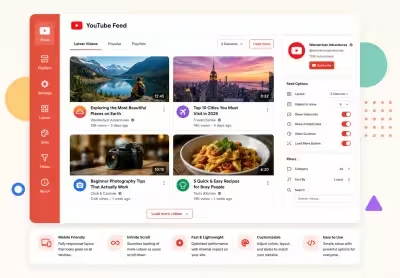
Your YouTube channel, on your Joomla site, without iframes everywhere.

Paste a server-side API key, choose a channel or playlist, and publish a responsive feed in minutes. Every tab in this demo spotlights a real configuration: search, feed tabs, channel cards, pagination modes, card styling, and more.

Live on this demo

Grid showcase strip

Use the variant tabs above the preview to jump between grid setups. Each page explains what you are seeing, then lets you interact with the live feed below.

Search and filters Latest, Popular, Playlists tabs Channel profile card Load more, pages, infinite scroll Card design and dark theme Playlist source Open on YouTube

Server-side API key

Calls YouTube Data API v3 from PHP. The key never appears in HTML or JavaScript.

Grid and more

Grid is the default. Also featured hero, slider, list styles, and a Shorts wall.

Search and sort

Channel search, playlist picker, and client or server sort without a page reload.

Feed tabs

Latest Videos, Popular, and Playlists as first-class tabs on channel feeds.

Channel card

Profile card with avatar, stats, and description. Place it top, bottom, left, or right.

Lightbox player

Privacy-friendly embed with keyboard nav and swipe on touch devices.

Smart pagination

Load more button, previous and next pages, or infinite scroll with animated loaders.

Design tokens

Columns, corners, shadows, dark theme, and accent color to match your brand.

Try it on your site

  1. API key Create a YouTube Data API v3 key in Google Cloud Console and restrict it to your server IP.
  2. Source Add a channel handle, ID, or URL. Or paste a playlist ID for a curated collection.
  3. Layout Pick grid, enable search or tabs, set pagination, and publish the module to a visible position.
Live preview of Easy YouTube Feed: Grid Overview

Live preview

Baseline grid below

This is the default starting point: six NASA videos, lightbox playback, and a visit-channel button. Use the tabs above to explore search, tabs, pagination, styling, and more.

Visit channel (opens in a new window)

Module settings Easy YouTube Feed: Grid Overview

Play with the Module Settings

By changing the module settings and applying them, you can see how the module behaves and how it affects the layout and appearance. You can experiment with different configurations and find the best settings for your needs.

How to create the API key

You need a Google Cloud API key with YouTube Data API v3 enabled. The module calls Google from PHP. The key is never printed in HTML or JavaScript.

  1. Open Google Cloud Console (opens in a new window) and create or select a project.
  2. Go to APIs and Services, then Library. Search for YouTube Data API v3 and click Enable.
  3. Go to APIs and Services, then Credentials. Click Create credentials, then API key.
  4. Restrict the key: Application restriction should be IP addresses (your server IPv4/IPv6), not HTTP referrers. If you already use HTTP referrers, add this site as http://demo.test/* and https://demo.joomlax.com/*. Referrer-only keys fail when PHP sends an empty Referer.
  5. API restriction: restrict to YouTube Data API v3 only.
  6. Paste the key into the field below. One key can be reused on several Easy YouTube Feed modules on the same site.

Quota: a new project usually has 10,000 units per day. Raise API cache (minutes) (default 45) so repeat page views do not hit Google. Do not put this key in Git, a public screenshot, or template overrides.

Playlist filter
Sort control
Show Visit channel
Feed tabs
Featured lead video
Equal card height
Show title
Show duration
Show date
Disable module CSS

All-access bundle

Unlock every JoomlaX extension in one plan

You have explored the demos — now get all 99+ extensions, ongoing updates, and full-time support. Plans start at $99.

  • Satisfaction guarantee
  • Secure SSL payment
  • Updates included

Mobile Menu

  • Store
  • Subscription
  • Contact
  • Login

    Don't have an account yet? Register now!